
Most people treat Pinterest like a mood board. They pin things they like, follow a few accounts, and wonder why their traffic never moves. If you’re using Pinterest for a business or blog, that approach will cost you months of wasted effort.
A real Pinterest content strategy turns the platform into a search engine that sends consistent, compounding traffic to your site.
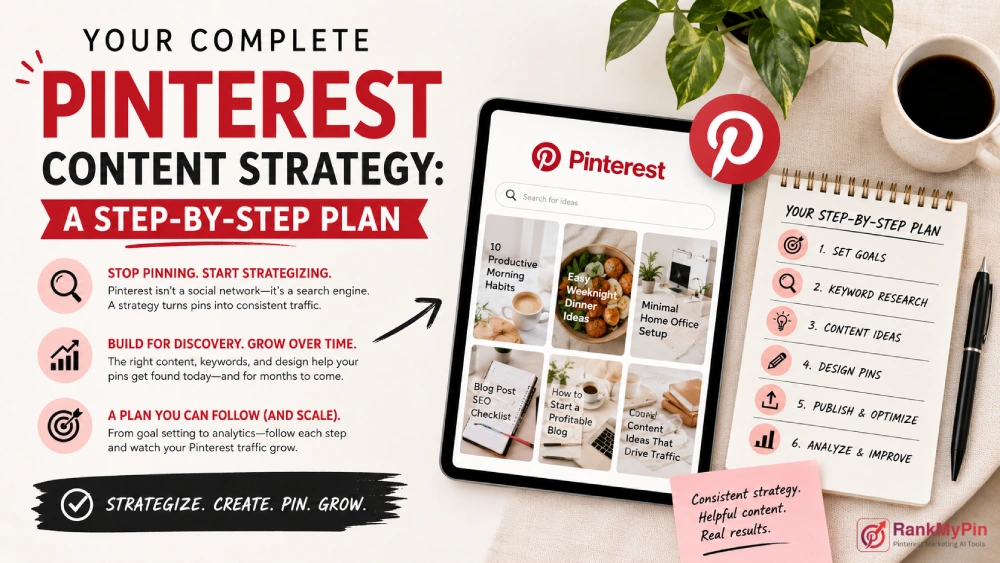
This guide walks you through exactly how to build one, from setting goals and finding keywords to designing pins and reading your analytics.
Table of Contents
What is a Pinterest Content Strategy?
A Pinterest content strategy is a documented plan covering what you publish on the platform, who you publish it for, and how you measure whether it’s working. It defines your board structure, content pillars, pin design rules, posting schedule, and keyword approach. Without this structure, you’re relying on luck. With it, you’re building an asset that grows over time, because Pinterest content keeps getting discovered for months or even years after you publish it.
Why Pinterest Still Deserves a Place in Your 2026 Marketing Plan
Pinterest is a visual search engine, not a social media feed. That distinction matters. When someone opens Instagram, they’re scrolling.
When they open Pinterest, they’re searching for something specific: a recipe, a home renovation idea, a workout plan, a product to buy.
According to Pinterest’s investor reporting, the platform surpassed 500 million monthly active users by late 2023, and that number has continued to climb.
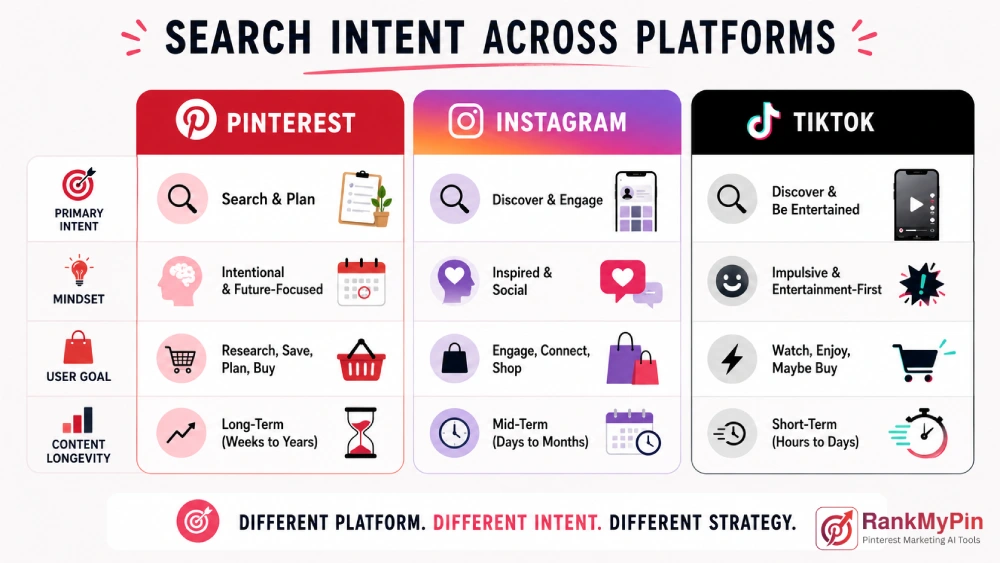
More importantly, Pinterest users tend to be in a discovery and buying mindset. That makes the platform unusually effective for driving qualified traffic, not just impressions.
Step 1: Define Your Goals and Know Your Audience
Before you pin a single thing, write down what success looks like for you. Are you trying to drive blog traffic? Grow an email list? Sell products? Each goal shapes the type of content you create and how you structure your boards.
Next, get specific about who you’re reaching. Pinterest skews toward users who are planning: decorating a home, preparing for a wedding, researching fitness goals.
Pinterest has particularly strong reach among adult women in the U.S., though its user base has diversified significantly over the past few years. (Source)
Ask yourself:
- What problems is my audience actively trying to solve?
- What stage of the decision journey are they in: awareness, research, or ready to buy?
- What would make them click through to my site instead of saving the pin and moving on?
Here is a free Pinterest Audience Targeting Suggestion tool to help you find your audience.
Step 2: Do Keyword Research the Pinterest Way
Pinterest runs on keywords. The algorithm surfaces pins based on what people type into the search bar, not based on who follows you. That makes keyword research the single most important skill you can develop for Pinterest growth.
Start by typing your main topic into the Pinterest search bar and looking at the colored suggestion tiles that appear beneath it.
Those tiles show you exactly what people are actively searching for. Build a list of 15 to 20 relevant keyword phrases from those suggestions.
Use those keywords in:
- Board titles and descriptions
- Pin titles (the text displayed in search results)
- Pin descriptions (the first 100 characters carry the most weight)
- Alt text on the images you upload
Don’t stack every keyword into every pin. Choose one primary keyword per pin and 2 to 3 supporting phrases. Natural, readable descriptions consistently outperform keyword-stuffed ones.
Use our free Pinterest Gap Finder and Pinterest Keyword Generator to opmtimize you research.
Step 3: Plan Your Boards and Content Pillars
Your boards are the structural foundation of your Pinterest presence. Each board should represent one clear topic, and the board title should use a searchable keyword phrase rather than a clever or personal name.
“Sarah’s Faves” tells the algorithm nothing. “Healthy Meal Prep Ideas for Beginners” tells exactly where and when to show your board.
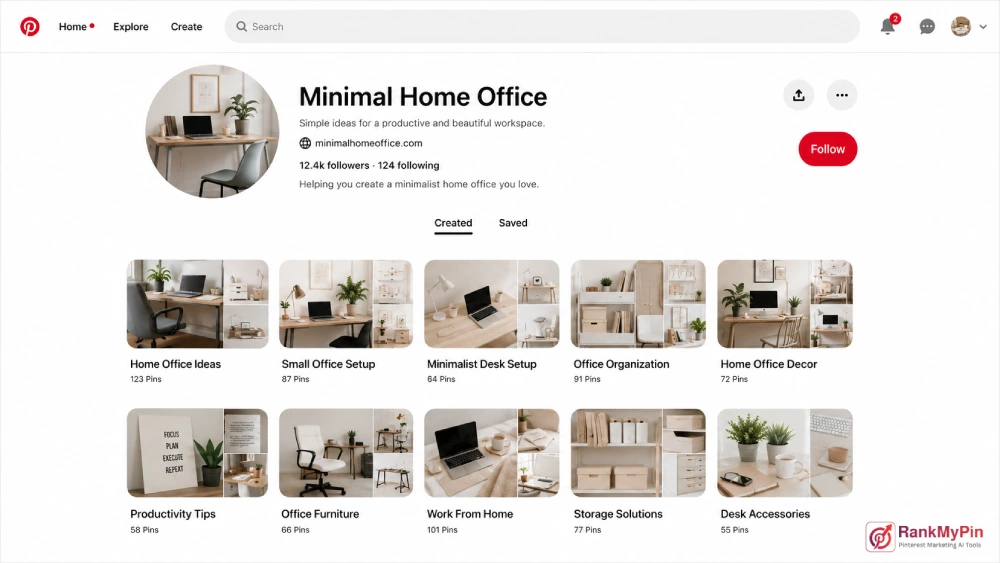
Aim for 10 to 20 boards that reflect your content pillars. Content pillars are the 4 to 6 broad topics your brand owns.
A personal finance blogger might organize around: budgeting basics, debt payoff strategies, investing for beginners, side hustles, and frugal living tips.
Keep each board focused. A broad “Home Decor” board will underperform compared to “Scandinavian Living Room Ideas” because the second one mirrors specific search behavior. The more precisely your board matches how people search, the better it indexes.
Step 4: Create Pins That Earn the Click
Design matters, but not in the way most people assume. Pinterest users scroll quickly.
Your pin needs to stop them and give them an immediate reason to click. That comes down to three things: the image, the text overlay, and the promise.
Use a vertical format (a 2:3 ratio, ideally 1000 x 1500 pixels) and keep the image high-contrast. Muted, dark, or visually cluttered images get lost in the feed. Bright backgrounds and bold subject shots consistently perform better.
The text overlay should answer one question: “What will I get if I click?” Be specific. “10 Budget Dinner Recipes” beats “Dinner Ideas.” “How I Paid Off $30K in 18 Months” beats “Debt Tips.”
Create multiple pins for the same piece of content. This is one of the highest-leverage habits in any Pinterest content strategy.
Design 3 to 5 different pin variations for each blog post or product page, then let performance data tell you which style your audience responds to best.
Step 5: Set a Posting Schedule That You Can Actually Maintain
Pinterest rewards consistent activity. Posting 20 to 30 pins per day was once the standard advice, but the algorithm has matured. Today, quality and keyword relevance matter more than raw volume.
A sustainable posting schedule looks like this:
- 5 to 15 pins per day total (a mix of your own content and curated repins from others)
- At least 1 to 3 fresh pins daily (new images, not repins)
- Steady daily activity rather than sporadic high-volume bursts
Use a scheduling tool to queue pins in advance. This keeps your account active and consistent even during weeks when you’re not actively creating new content.
How do You Measure Whether Your Pinterest Strategy is Working?
Pinterest Analytics, available free with any business account, tracks impressions, saves, link clicks, and outbound clicks. For traffic-focused goals, outbound clicks are the metric that matters most. Impressions measure reach; clicks measure intent.
Check your analytics monthly rather than daily. Pinterest traffic builds slowly and compounds over time. A pin published today may not reach its peak performance for 60 to 90 days. Evaluating results week to week leads to premature decisions based on incomplete data.
Track which boards and pin designs generate the most outbound clicks, then focus more of your energy on those formats. This feedback loop is what separates accounts that plateau from ones that keep growing.
What types of content perform best on Pinterest?
Not all content categories get equal traction. The highest-performing content on Pinterest consistently includes:
- How-to guides and tutorials: step-by-step visuals work especially well
- Listicles and roundups: “15 Ways to…” pins tend to earn high save rates
- Seasonal and trend-based content: plan 45 to 60 days ahead of the relevant season
- Before-and-after transformations: home decor, fitness, and design projects all perform well in this format
- Product-focused pins: particularly for eCommerce accounts with clear pricing and direct benefits shown
Evergreen content is your long-term asset. A pin titled “How to Start an Emergency Fund” will keep driving qualified traffic years after you first publish it, which is a dynamic almost no other platform offers.
Common Pinterest mistakes that slow your growth
Even with a solid strategy in place, a few recurring habits will hold you back:
- Skipping keyword research: Beautiful pins with no searchable text in the title or description will not be found
- Publishing only one pin per piece of content: This limits how many search queries your content can appear for
- Relying on personal or unfocused boards: Overly broad boards don’t index effectively for specific searches
- Quitting too early: Most accounts see meaningful growth between months 3 and 6, not in the first few weeks
Pinterest’s Business resources cover platform-specific best practices and are updated as the algorithm evolves, making it a reliable reference point as you refine your approach.
Frequently Asked Questions
How often should I post on Pinterest to grow my account?
Aim for 5 to 15 pins per day, with at least 1 to 3 being fresh content you created. Consistency matters more than volume. An account posting 7 pins every day will outperform one that posts 50 pins one week and goes silent the next.
How long does it take to see results from a Pinterest strategy?
Most accounts start seeing meaningful traffic growth between 3 and 6 months of consistent effort. Pins can continue driving traffic 12 to 24 months after publishing, which is significantly longer than most social media content.
Do I need a business account to run a Pinterest strategy?
Yes. A Pinterest business account is free and gives you access to Pinterest Analytics, Rich Pins, and promotional tools that aren’t available on personal accounts. There is no reason not to switch.
Can I use the same pin image more than once?
You can create multiple unique pins pointing to the same URL, as long as each uses a different image. Reusing the exact same image repeatedly across multiple boards can be flagged as spam by the algorithm.
What is a Rich Pin, and should I use one?
Rich Pins automatically pull metadata from your website, including the title, description, and price, and attach it directly to your pin. They make pins more informative and are worth enabling if your site runs on a standard CMS like WordPress. Pinterest’s business documentation walks through the setup process.
Is Pinterest still effective for driving website traffic in 2026?
Yes, especially for niches like food, home decor, fashion, personal finance, DIY, health, and parenting. Its search-based model gives content a longer shelf life than social feeds, making it one of the more efficient traffic sources for content creators and product-based businesses.
Conclusion
Your Pinterest strategy won’t produce overnight results, but it will produce lasting ones. Start with clear goals, build keyword-rich boards, create multiple pin designs per content piece, and review your analytics monthly. The accounts that grow on Pinterest aren’t always the ones pinning the most. They’re the ones pinning with a clear plan behind every post.