
You can spend hours building a well-designed pin, hit publish, and watch it disappear in a crowded feed. The reason rarely has to do with luck.
Pinterest pin optimization is the practice of making deliberate choices across your image, text, and account setup that tell the algorithm what your content is about and who should see it.
With 619 million monthly active users, Pinterest runs on search, not social feeds. Posts do not vanish in 24 hours. A pin optimized correctly today can pull steady traffic months from now.
Here’s what this guide covers:
- The core signals Pinterest uses to rank and distribute pins
- How to format images for maximum feed visibility
- How to write titles and descriptions that show up in search
- Why do fresh pin designs outperform repinning the same image
- What saves, clicks, and boards do to your long-term reach
If your pins are collecting low impressions despite solid visuals, one of the factors below is almost always the cause.
Table of Contents
Key Takeaways
- Pinterest functions as a visual search engine, making keywords in titles and descriptions your top ranking tool
- A 2:3 aspect ratio (1000 x 1500 pixels) gives pins the largest share of mobile feed space
- Fresh pin images consistently outperform recycled repins
- Saves signal more value to the algorithm than likes or comments
- Your boards, profile, and claimed website affect every pin you publish, not just individual ones
Quick Answer
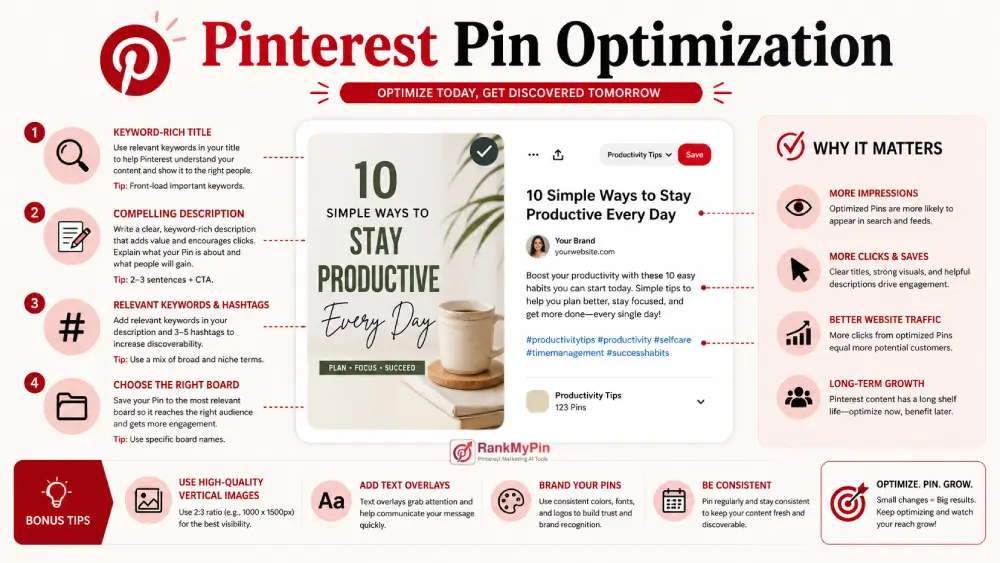
Pinterest pin optimization is the process of designing, writing, and organizing pins so Pinterest’s search and recommendation systems show them to the right users. Pins rank when they pair a 2:3 vertical image with a keyword-rich title, a specific description, a topic-matched board, and early engagement signals like saves and clicks.
How Pinterest actually decides what ranks
Pinterest works more like Google than Instagram. When someone searches for a topic, the platform scores every eligible pin across four signals: pin quality, board relevance, domain trust, and pinner activity.
Pin quality measures how quickly a pin earns saves, clicks, and shares after it goes live. Board relevance checks whether the pin sits on a board with a matching topic.
Domain trust reflects how credible your linked website is, which is why claiming your domain inside Pinterest settings is a baseline requirement. Pinner activity tracks whether your account posts consistently and follows platform guidelines.
A polished pin design will not overcome a broken link, an off-topic board, or an empty description. All four layers need attention before the algorithm will distribute your content widely.
Pin design and image specifications
Use the 2:3 aspect ratio
According to Pinterest’s official creative best practices, the recommended format for every pin is a 2:3 vertical aspect ratio. The standard 1000 x 1500 pixel size hits that ratio cleanly, loads fast on mobile, and stays sharp on high-density screens.
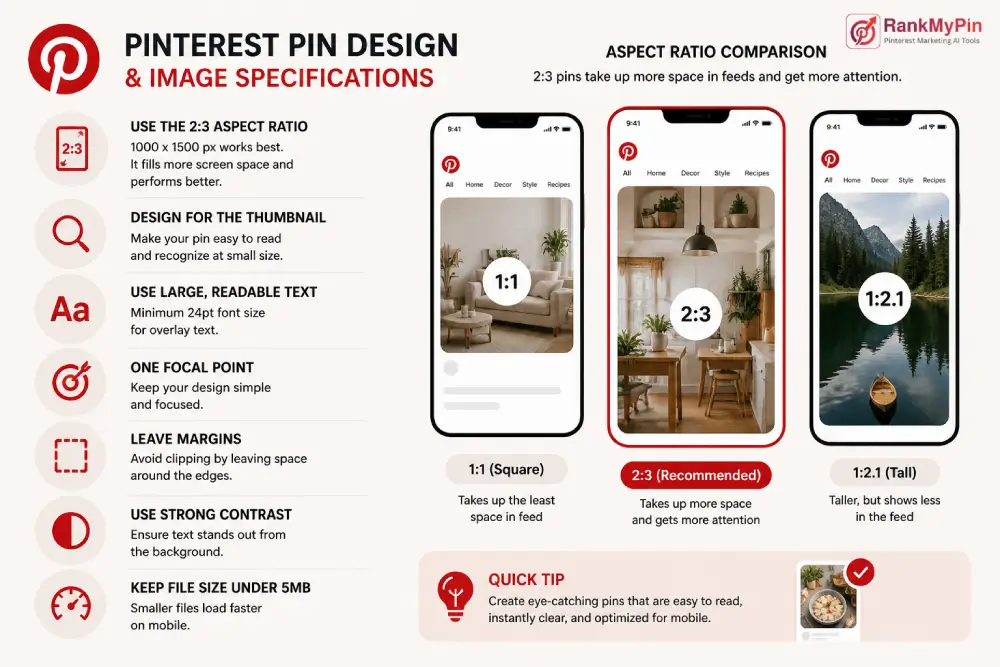
Pinterest has stated that other aspect ratios can negatively affect pin performance, so treating 2:3 as your default rather than an option is the safer and smarter move.
Square pins still appear in feeds, but vertical pins take up more screen real estate and capture more attention before a user scrolls past.
Design for the thumbnail, not the full canvas
Your pin shrinks to a small thumbnail inside the home feed. Design choices that look sharp in a design tool at full size can become unreadable at thumbnail scale.
- Use a minimum font size of 24pt for any overlay text
- Pick one clear focal point instead of a dense, busy layout
- Leave margins around all edges so text does not get clipped by Pinterest’s rounded corners
- Choose a strong contrast between text and background colors
- Compress images to under 5MB so they load quickly on slower mobile connections
Writing pin titles and descriptions that rank
Titles
Pinterest allows 100 characters in the title field, but feeds display only the first 30 to 40 before cutting off. Your primary keyword phrase needs to come first, followed by a specific benefit or qualifier:
- “Budget Living Room Makeover Ideas Under $200”
- “Quick High-Protein Breakfast Recipes for Busy Mornings”
Lead with the idea itself. Not your brand name, and not a clever phrase that buries the keyword.
Try our free Pinterest pin title generator to find your perfect pin title.
Descriptions
Descriptions support up to 500 characters. Write two or three natural sentences explaining what the pin delivers and who it helps. Place your primary keyword near the beginning and include one or two related terms without forcing them.
According to Pinterest Business, 96% of top searches on Pinterest are unbranded. Users search for ideas and outcomes, not company names. Write descriptions the way a real person would phrase a search query, not the way a marketing team writes a tagline.
A small number of topical hashtags will not hurt, but they carry far less ranking weight than keyword-rich text inside your title and description.
We also have a Pinterest pin description generator for your perfect pin description.
Keyword research on Pinterest
Type a seed term into the Pinterest search bar and watch the autocomplete suggestions populate. Those phrases come from real, active searches updated regularly based on user behavior. The colored topic tiles that appear below the results show how Pinterest categorizes related content and reveal secondary keywords worth targeting.
Use those phrases across every available text field:
- Pin title and description
- Board name and board description
- Image alt text
- Profile bio
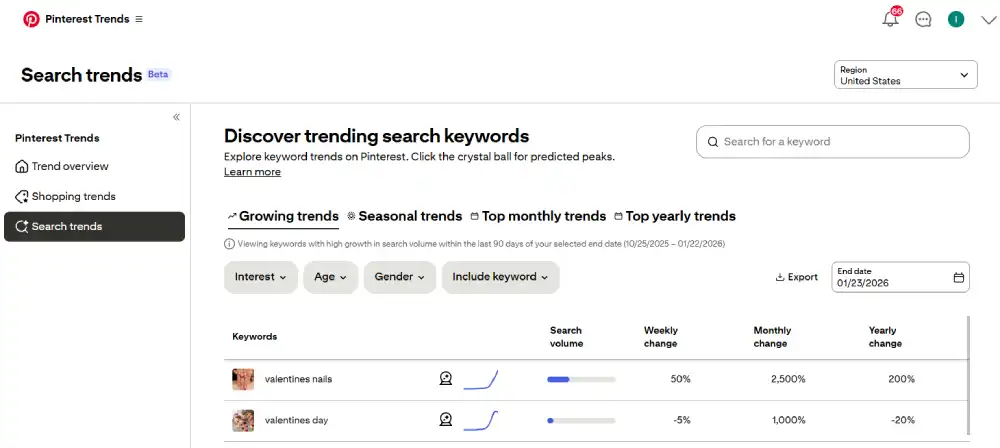
The free Pinterest Trends tool lets you compare search volume between topics and spot seasonal peaks weeks before they hit. If you publish content tied to seasonal moments, this data tells you exactly when to start, not just when it feels right.
If you are confused about what keyword to use, give our free Pinterest keyword generator a try.
Why fresh pin designs consistently outperform repins
Pinterest prioritizes new images over recycled content. A fresh pin means a new visual file pointing at a URL, not the same image saved again to a different board.
Pinterest’s content creation fundamentals recommend planning your content calendar 45 to 60 days in advance. Pinterest users plan ahead for seasonal events and purchases, so content published early captures search traffic before it peaks.
Practical rules for building fresh content:
- Create three to five distinct pin designs per piece of content, each using a different image, layout, and headline
- Wait two to three days before saving the same URL to a new board
- Avoid pinning the same image to multiple boards on the same day, which can flag your account as spam
- Audit pins quarterly and refresh low performers with updated designs and copy
Changing only the text overlay on an identical background does not qualify as fresh. The visual needs to be genuinely different.
Engagement signals that drive long-term ranking
Saves carry more weight than any other engagement type. A save tells Pinterest that a user valued the content enough to return to it later. Comments and likes carry far less algorithmic influence.
Outbound clicks are the second most important signal. If a user clicks through but bounces off your page immediately, the quality signal reverses. A fast-loading, mobile-friendly landing page that delivers exactly what the pin described protects that signal.
To improve early engagement after publishing:
- Save to your most relevant board first, then rotate to secondary boards over the following days
- Add a specific number, outcome, or benefit to your image text (“7 Steps,” “Under $30,” “Weekend Project”)
- Match your pin’s visual and promise tightly to what the destination page actually shows
- Schedule pins during your audience’s active hours, typically weekday evenings and weekend mornings
Boards, profile, and account signals
Pins do not rank in isolation. The account structure behind them affects every pin’s starting distribution. A well-organized account gives each new pin a stronger position from day one.
Profile basics
- Claim your website in Pinterest settings to establish domain trust with the algorithm
- Switch to a free Pinterest Business account to access analytics and performance data
- Write a profile bio that includes your core niche keywords naturally
- Use a consistent profile photo or logo for brand recognition
Board structure
- Name boards with specific, searchable terms such as “Modern Bathroom Tile Ideas” rather than vague labels like “Home Stuff.”
- Write board descriptions of 200 to 300 characters using natural keyword phrases
- Aim for 20 to 100 pins per board before branching into new topics
- Always save a new pin to its most relevant board first before spreading it to secondary boards
Find creative Pinterest board names instantly with our free board names generator.
Common mistakes that quietly limit pin performance
A few habits show up repeatedly in underperforming accounts:
- Uploading horizontal or square images that lose feed space to vertical pins
- Copy-pasting identical descriptions across multiple pins, which signals low-quality output
- Linking every pin to the site homepage instead of the specific page that matches the pin content
- Skipping alt text entirely, which removes a keyword placement and accessibility opportunity
- Ignoring Pinterest Analytics rather than using it to identify which formats earn the most saves and clicks
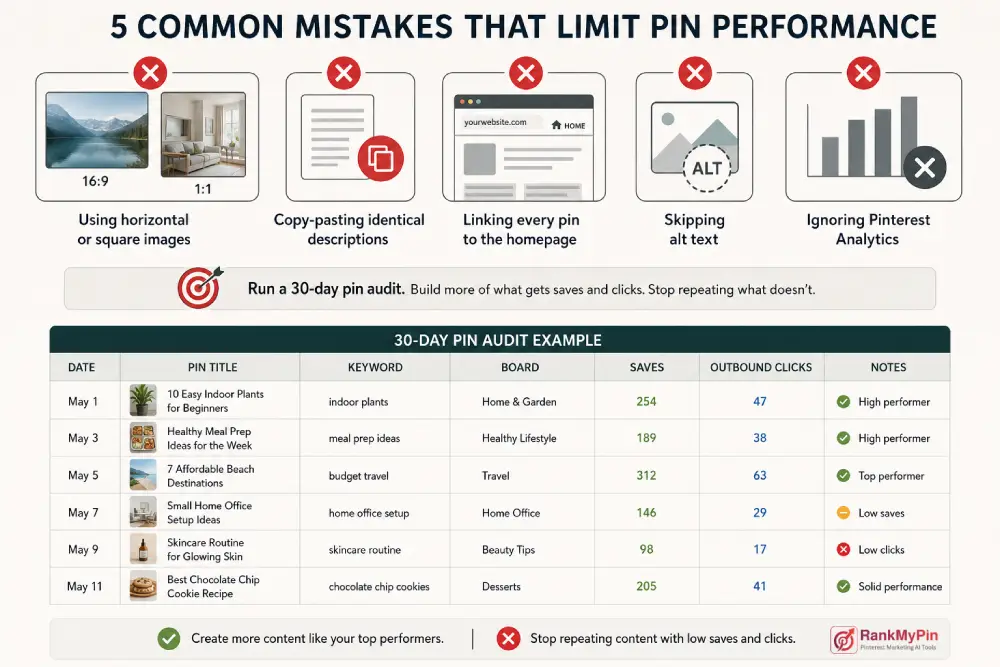
Run a 30-day PIN audit. Sort your recent pins by saves and outbound clicks. Build more content using the formats and keywords that performed well, and stop repeating the ones that did not.
FAQs
Does pin design matter more than keywords for Pinterest ranking?
Both work together, and you need both. Keywords determine whether your pin appears in search results at all. Design determines whether the user saves or clicks after seeing it. A sharp image with weak copy rarely surfaces in results. Strong keywords with a forgettable visual appear but rarely convert. Strong Pinterest pin optimization addresses both at the same time.
How long does it take a new pin to rank?
Most pins start collecting impressions within 24 to 48 hours of publishing. Consistent ranking traction, meaning steady saves and search placement, typically builds over two to six weeks. Well-optimized pins can keep pulling traffic for months or even years because Pinterest content does not expire the way posts do on faster-moving platforms.
How many pins should you post per day?
Most accounts see their best results at three to ten fresh pins per day. Posting 50 or more daily can trigger Pinterest’s spam detection and reduce distribution across your whole account. Spreading pins across the day and keeping each one visually distinct produces better results than posting in large batches.
Why does my pin get impressions but no clicks?
This usually means the image gets initial attention but fails to communicate a clear reason to click. Common causes include a vague title, a missing text overlay, or a landing page that does not match what the pin promised. Try a more specific headline that states a concrete outcome, and confirm your destination page actually delivers what the pin described.
Final thoughts
Pinterest pin optimization rewards consistency over perfection. Use the right image size, write for search intent, keep your boards focused, and produce genuinely fresh designs.
Check your analytics monthly, put more effort into the formats that earn saves, and cut the ones that do not. That steady, signal-driven approach is what turns Pinterest into a traffic source that keeps building long after you hit publish.