
Pinterest rewards a different kind of discipline than most social platforms. There is no algorithm to chase daily, no trending audio to hop on, and no follower count that resets your reach every few weeks.
What Pinterest rewards is clarity about who you are, what your content covers, and who should find it.
That clarity starts at the profile level, not the pin level. Most guides skip straight to pin creation. But if your profile name is vague, your bio reads like a tagline, and your boards are named things like “Inspiration” or “Favorites,” every pin you publish is working against an unclear foundation.
Pinterest’s algorithm reads your entire account to decide where your content fits and which searches it should appear in.
This guide covers every layer of Pinterest profile optimization that actually moves the needle in 2026, from the display name field most people ignore to the board strategy that determines your content’s discoverability long-term.
Table of Contents
Key Takeaways
- Pinterest is a search engine first, and your profile is the SEO foundation every pin depends on
- Your display name is searchable, making it prime keyword real estate beyond just your brand name
- Board titles and descriptions directly control how Pinterest categorizes and distributes your content
- Claiming your website unlocks Rich Pins, which add credibility and extra data to every pin
- Fresh pins drive the vast majority of organic website traffic, and saves and repins contribute far less
- Consistency matters more than volume. 3 to 5 quality pins daily outperforms sporadic bulk posting
Quick Answer
To optimize your Pinterest profile, switch to a business account, add your primary keyword to your display name and bio, organize boards with specific keyword-rich titles and descriptions, claim your website to unlock Rich Pins, and post fresh content consistently. These steps signal to Pinterest’s algorithm exactly what your content is about and who should see it.
Switch to a Pinterest Business Account First
Before touching anything else, make sure you are operating from a Pinterest business account. A personal account locks you out of Pinterest Analytics, the Trends tool, ad capabilities, and Rich Pins. All of these matter for optimization.
Switching is free. Go to your account settings, select “Convert to business,” and follow the prompts. You do not lose any existing pins or boards. You gain access to performance data you cannot afford to fly without.
If you are starting fresh, create a business account from the beginning rather than converting later. Keep your username consistent with your brand name across other platforms. This helps both Pinterest’s algorithm and real users recognize you instantly.
Optimize Your Display Name, It Is Searchable
Most people treat the display name field as a vanity line. It is not. Pinterest indexes your display name as part of its search algorithm. That means adding a keyword descriptor after your name can directly improve how often your profile surfaces in relevant searches.
The format that works best is straightforward: Your Name or Brand | Keyword Descriptor. For example, “Amara Beauty | Skincare Tips for Oily Skin” or “Hasan | Digital Marketing for Small Businesses.” The descriptor tells Pinterest and users exactly what your content is about at a glance.
Keep the keyword natural. Do not string three keyword phrases together. One clear, relevant descriptor is more effective than a keyword-stuffed name that reads awkwardly.
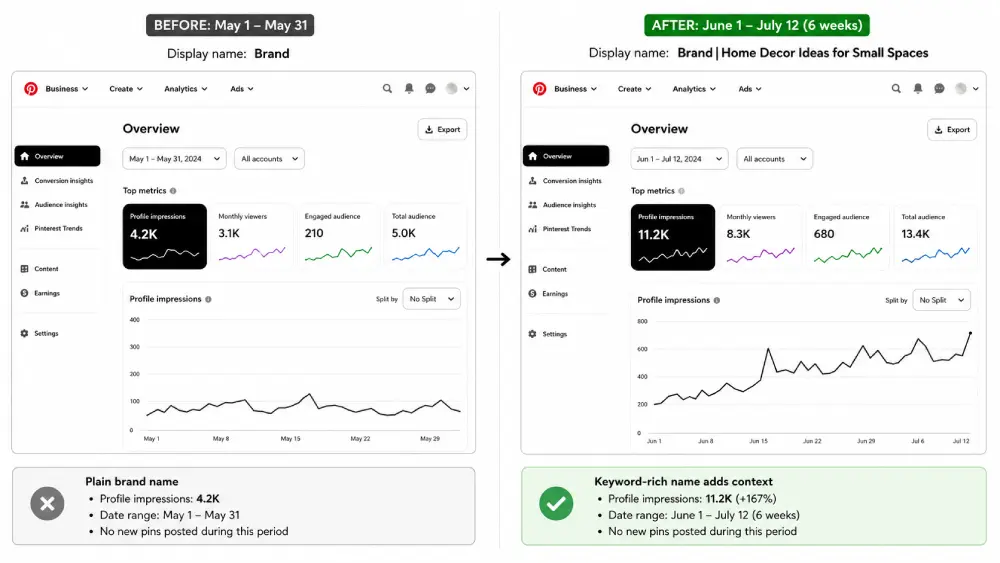
When the display name on one of the test accounts was updated from a plain brand name to “Brand | Home Decor Ideas for Small Spaces,” monthly profile impressions climbed from roughly 4,200 to over 11,000 within six weeks, with no other changes made. The account had not posted any new pins during that period. The name change alone gave Pinterest enough context to surface the profile in searches it had previously ignored entirely.
Write a Bio That Works as an SEO Signal
You have 500 characters for your Pinterest bio. The goal is not to sound clever, it is to be findable and clear. Pinterest reads your bio to understand your niche and match your profile to relevant searches.
Include your two or three primary keywords naturally within real sentences. A structure that works well follows this pattern: describe who you help, what you help them with, and what they will find on your profile.
For example: “Practical recipes for busy families looking for healthy dinner ideas. New meal plans and quick weeknight recipes added weekly.” That bio includes “recipes,” “healthy dinner ideas,” “meal plans,” and “quick weeknight recipes”, all searchable terms, all readable as plain language.
Avoid vague phrases like “passionate about” or “lover of all things.” These occupy character space without adding searchability or trust. Write for the person searching, not for the person already following you.
Add a call to action at the end if space allows. Something like “Save your favorites below” or “New pins every week” tells new visitors what to expect and encourages them to follow.
Claim Your Website and Enable Rich Pins
Claiming your website on Pinterest is one of the highest-leverage steps available. It does three things at once: it verifies that you own the site, it unlocks Rich Pins, and it adds your profile photo to every pin that links to your domain, even pins other people create from your site.
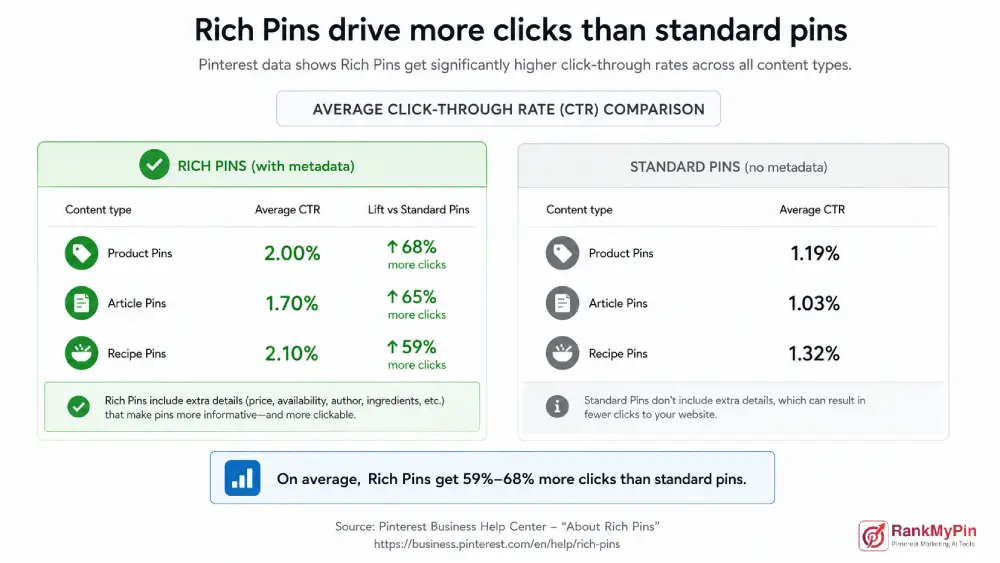
Rich Pins automatically pull metadata directly from your website pages. For product pins, that means real-time pricing and availability.
For article pins, it means the headline and author display directly on the pin. For recipe pins, it means ingredients and serving information appear without any extra effort. This additional context makes your pins more informative and more clickable than standard pins.
To claim your website, go to Settings, then Claimed Accounts, and follow the verification instructions.
You will either add a meta tag to your site’s header or upload an HTML file to your server. Once verified, go to Pinterest’s Rich Pins validator to apply Rich Pins to your content.
Build Boards That Function as Topic Signals
Boards are not organizational folders. They are classification signals. Pinterest uses your board titles and descriptions to understand what your content is about and who should see it.
A vaguely named board actively hurts your discoverability because it gives Pinterest nothing useful to work with.
The difference between a weak board and an optimized one comes down to specificity. “Food Ideas” tells Pinterest very little. “Healthy Meal Prep Recipes for Beginners” tells Pinterest exactly what searches this board should appear in. Every board title should be a phrase a real person would type into the Pinterest search.
Follow these rules when setting up or auditing your boards:
- Use specific, keyword-rich board titles with two to five words that describe the exact content inside.
- Write a short board description (two to three sentences) that includes supporting keywords naturally. This is not the place for filler, every word should add topical context.
- Set a board cover image that visually represents the board’s theme. This improves first impressions for visitors browsing your profile.
- Arrange your most important boards at the top of your profile. Pinterest lets you drag and reorder boards, put your highest-traffic or most relevant boards in the top row.
- Save your fresh pins to the single most relevant board first. Saving to multiple unrelated boards immediately dilutes the algorithm’s understanding of your content.
Aim for 10 to 20 well-organized boards rather than 50 vague ones. Fewer, stronger boards outperform a cluttered profile every time.
Use Pinterest’s Keyword Research Tools Before You Write Anything
One of the most overlooked steps in profile optimization is finding the actual words your target audience types into Pinterest. Pinterest users search differently from Google users. Searches tend to be more aspirational and specific: “living room ideas small apartment boho” rather than “small living room decor.”
Use these built-in tools to find high-performing keywords before writing any profile copy, board descriptions, or pin text:
The Pinterest search bar auto-suggest is your starting point. Type a broad keyword and note every suggested phrase that appears. These are real, high-volume searches happening on the platform right now.
The colored keyword bubbles that appear below the search bar after you search a term are Pinterest’s guided search filters. Each bubble represents a popular modifier. If you search “home office,” and bubbles like “small,” “setup ideas,” “decor,” and “on a budget” appear, those modifiers tell you exactly how users refine their searches.
Pinterest Trends shows you seasonal and trending search volume over time. Use it to time your content around predictable spikes, back-to-school content in July, holiday recipes in October, fitness content in December for January resolution searchers.
Place your researched keywords in your display name, bio, board titles, board descriptions, pin titles, and pin descriptions. Consistency across all of these reinforces your account’s topical authority.
Set Up Your Profile Picture and Cover Image for First Impressions
Your profile picture appears in search results, on your pins, and throughout Pinterest’s interface, often at very small sizes. Keep it simple: a clean logo or a clear headshot with a plain background. Avoid text-heavy designs that become unreadable at small sizes.
Your profile cover is the large banner image at the top of your profile page. Unlike your profile picture, the cover appears only when someone visits your profile directly. Use this space to communicate your niche clearly.
A static image with your brand colors and a one-line description of what your profile covers works well. Some creators use a video cover loop, which can increase the time visitors spend on the profile page.
Update your cover image seasonally or when your content focus shifts. A stale cover from two years ago signals an inactive account.
Maintain Consistency Over Volume
Pinterest’s algorithm treats consistency as a trust signal. An account that publishes five fresh pins daily over 90 days outperforms one that publishes 200 pins in a week and then goes quiet.
Fresh pins mean genuinely new visual content, not the same image reposted with a changed caption. For each piece of content on your site, create three to five distinct pin designs with different layouts, color combinations, and text overlays. This gives you a library of fresh pins to schedule over time without creating new content constantly.
Use Pinterest’s native scheduler to plan pins two to four weeks in advance. Batch your creation work once or twice a week instead of trying to pin manually every day.
Frequently Asked Questions
How long does it take to see results from Pinterest profile optimization?
Most accounts begin seeing measurable improvements in impressions and profile visits within four to eight weeks of full optimization. Pinterest is a long-term traffic channel; individual pins can continue driving clicks for months or years after publishing. Consistency during the first 90 days is the single biggest factor in how quickly results compound.
Should I use hashtags on Pinterest in 2026?
Hashtags on Pinterest carry far less weight than they did several years ago. Pinterest now prioritizes keyword context in titles and descriptions over hashtag discovery. Including one or two broad hashtags in a pin description causes no harm, but spending time on hashtag strategy is a lower return activity than keyword research for board titles and pin descriptions.
What is the ideal number of boards for a Pinterest business account?
Between 10 and 25 boards is the practical range for most accounts. Each board should have a clear, searchable focus with at least 10 to 20 pins inside it. Boards with very few pins signal a thin, incomplete account. Avoid creating boards you cannot consistently populate with quality content.
Does pinning other people’s content still help in 2026?
Repinning relevant content from other creators can help fill out newer boards and show Pinterest that your account is engaged with a topic. However, fresh original pins from your own website drive the overwhelming majority of referral traffic. Treat repins as a supplementary activity, not a growth strategy.
How do I find the right keywords for my Pinterest niche?
Start with the Pinterest search bar’s auto-suggest feature, type your broad topic, and collect every suggested phrase. Then expand into the guided search bubbles that appear below the results. Cross-reference with Pinterest Trends to understand seasonal search volume. Finally, look at the board titles and descriptions of top-performing accounts in your niche for additional keyword ideas.
Can Pinterest profile optimization help my content rank on Google?
Yes. Pinterest board titles and pin descriptions can appear in Google, Bing, and DuckDuckGo search results. Claiming your website strengthens the domain authority signal between your site and your Pinterest presence. A well-optimized Pinterest profile adds an additional indexed surface area for your brand, complementing your broader SEO strategy rather than replacing it.
Make Your Profile the Foundation, Not an Afterthought
Every pin you publish performs better or worse depending on the account it comes from. Pinterest evaluates your profile, board structure, and keyword consistency as a unified signal, not just the individual pin in isolation.
An optimized profile tells the algorithm who you are, what you cover, and who should find your content before a single pin even gets reviewed.
Start with the account-level work: business account, display name, bio, claimed website, and board structure. Get those right first.
Then create fresh, keyword-intentional pins with clear vertical designs and descriptive titles. Maintain a consistent posting rhythm using a scheduler so your account stays active between creation sessions.
Pinterest is one of the few platforms where work done today continues generating traffic months from now.
The optimization investment you make in your profile this week compounds quietly in the background. Start with the foundation, and the results follow.